 Adaptive 8th grade mathZombie Math
Built for learning that lasts.
Zombie Math helps students learn new concepts, provides support when they need it, and automatically revisits key skills over time — strengthening retention so students remember what they’ve learned.
Create a teacher account01The problem
Every classroom has students with different levels of preparedness.
No matter how carefully a lesson is planned, one pace never fits a whole room. Teachers are expected to reach them all at once — Zombie Math helps make that possible.
- Some students finish in minutes.
- Some students are still confused.
- Some forgot last month’s material.
- Some are ready for Algebra.
02How it works in practice
Six decisions that make practice possible.
We all need a place to start.
Accessible entry points are built into every lesson, so a student who doesn’t know where to begin still has somewhere to begin.
The lesson rises to meet them.
Once a student finds their starting place, the increasing complexity of material is well paced.
Different angles on the same idea.
Question types change throughout a lesson to keep students engaged, and to get them thinking about why a concept works the way it does — not just how to answer it.
A wrong answer never costs progress.
Progress only carries forward, so students can try boldly without fear of being sent back because of a wrong answer or a small mistake.
Some of the points come from coming back.
Lessons earn part of a student’s grade; the rest is earned in spiral review that returns old content over time, tailored to each student.
Facts and integers, built in.
Dedicated fact and integer practice frees up the working memory students need to master complex problems.
03See a student’s view
Scaffolding where students need it most.
A student who stalls on a multi-step equation gets it broken into single decisions, each step checked on its own. A wrong step costs no points — it just asks again. Work through it yourself to see what your students experience.
Solve for x:
Subtract 2x from both sides. What is 5 − 2?
04In the classroom
Why teachers like it
Different students. One classroom.
Adaptive lessons help meet students where they are at.
Intervention without extra prep.
Students receive step-by-step scaffolding exactly when they need it — less frustration, and you are free to work with individuals.
Long-term retention.
Spiral review automatically revisits earlier skills, helping students hold onto what they have learned all year.
Meaningful mastery.
Finishing a lesson isn’t the finish line. Students keep earning mastery by demonstrating understanding over time.
05Curriculum
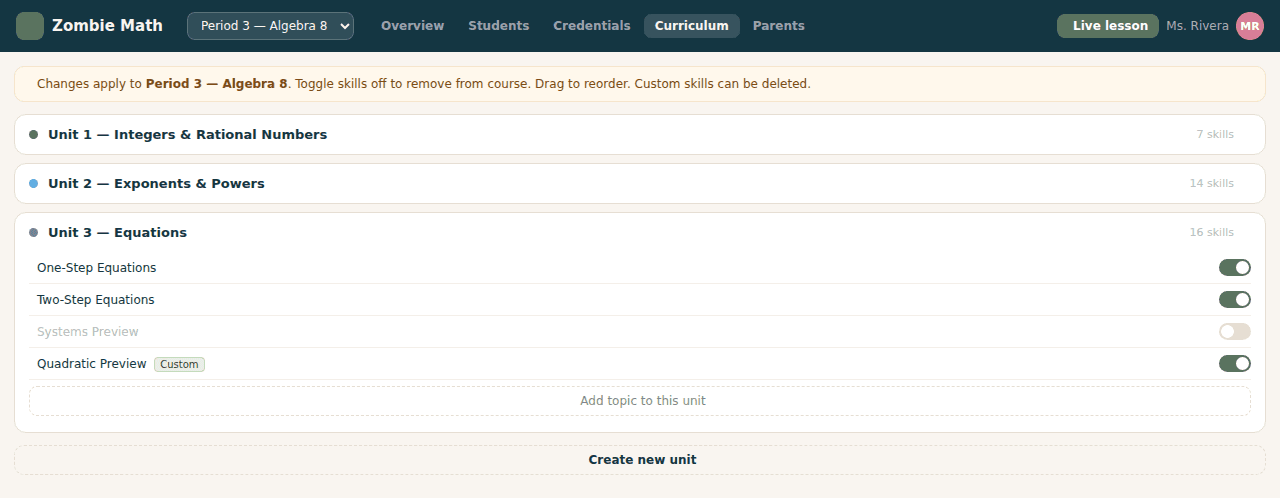
Built around real standards — yours to adjust.
A complete Grade 8 course arrives ready to teach, sequenced unit by unit and aligned to Common Core. From there, each class is yours to customize.
06What we believe
Lost confidence in math doesn’t need to be permanent. It can be rebuilt.
A place to start, room to make mistakes, and skills that come back and stay — none of it is dramatic on its own. Together, over a year, it’s how a student who was sure they were bad at math quietly stops believing it.
07Teacher dashboard
What can you see?
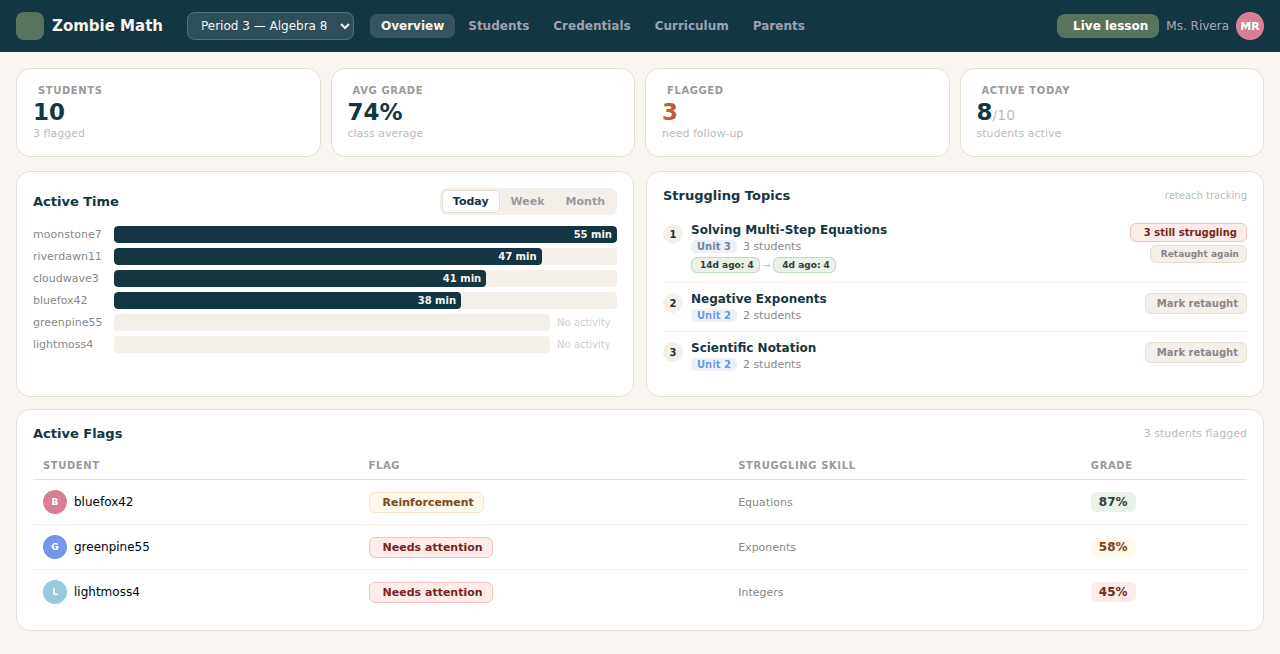
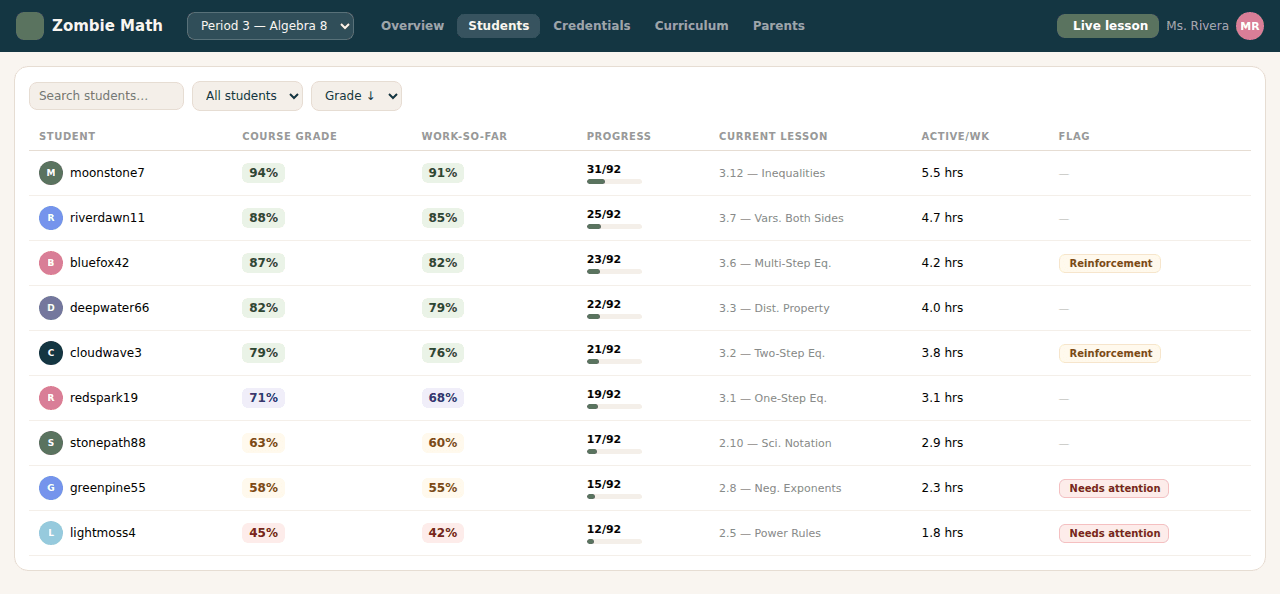
Everything you’d need before Monday’s small groups — per student, per skill, no report building required.
- Course grade & work-so-far
- Progress and current lesson
- Struggling topics + reteach tracking
- Scaffold usage
- Active time, per student
- Spiral review completion
08Live teaching
Teach the whole class, live.
Open a session on any lesson and share the link. Students are in it the moment they click — no accounts to make, nothing to install, nothing to set up in the five minutes before class.
- Students join from one link — no account, nothing to install
- One card per student: the question they are on, correct and incorrect submissions so far
- Raised hands and idle students sort to the top
- Real-time feedback of what students are mastering and what they need more support with
- Pause everyone’s screens for a teachable moment
- Nudge one student without interrupting the rest
- Nothing is stored — close the tab and the session is gone
Watch a five-minute walkthrough
09Classroom use
How do I use it?
It fits the slots you already have in the week — no schedule rebuild.
- Independent practice
- Bell work
- Intervention
- Homework
- Core replacement
- Small groups
- Early finishers
- Summer learning
10The difference
What makes Zombie Math different

Give every student a path to success.
Whether students need extra support, additional challenge, or simply more chances to remember what they’ve learned, Zombie Math provides adaptive instruction that grows with them.
Create a teacher account12 units, covering the full 8th-grade standards.*
*Before customization — teachers can remove topics from a course.